Build
Writing strategies by hand
The workspace is a real IDE in your browser: a file tree, a Python editor with live intelligence, tests, snapshots, and run buttons. This guide explains the layout, what every file in a strategy workspace does, the contract your strategy code fulfills, what the engine gives it, what the platform adds around it, and the safety rails around all of it.
This guide is written for the platform's strategy SDK 1.0.0 (surface
revision 310901161cb2) and NautilusTrader 2.x. The
editor's own completions, the agent resources and the AI assistant state the same
version — code against these, not another version's documentation.
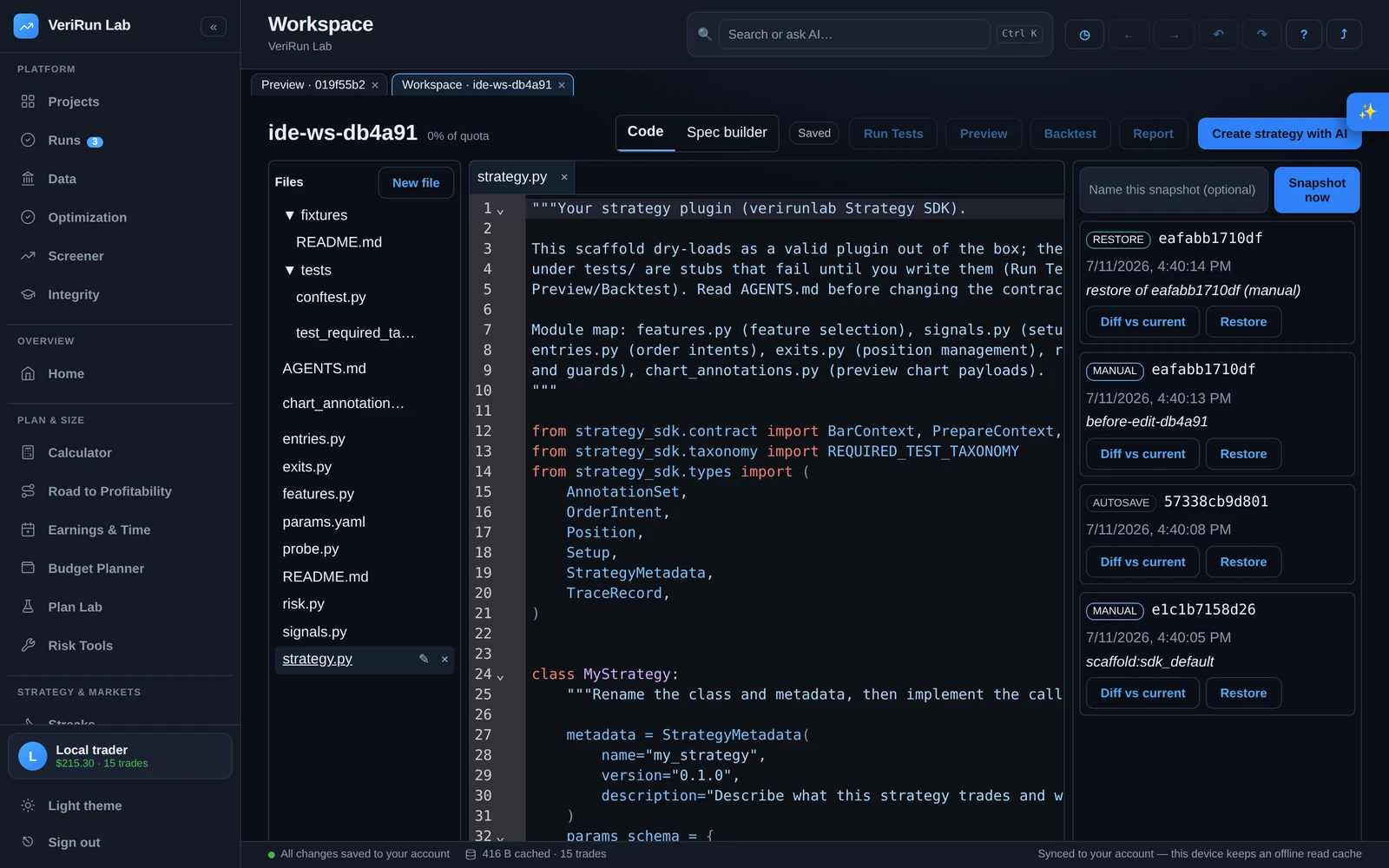
The workspace layout
- Header — the workspace name, a storage-quota chip (“N% of quota”), a mode toggle between Code and Spec builder, the autosave chip, the run buttons (Run Tests, Preview, Backtest, Run Notebook), Strategy summary, and Create strategy with AI.
- Left — Files. The file tree, with New file, rename and delete. A dot marks files with unsaved changes.
- Center — the editor, with tabs for each open file. From the keyboard the tab row is one stop: Tab reaches the open file's tab, the left/right arrow keys (or Home and End) move between tabs without opening them, Enter opens the one you are on, and Delete closes it.
- Right — the side panel, switching between the snapshot history timeline and the AI builder.
- Bottom — the panel strip with five tabs: Problems (diagnostics from the editor, the import lint and the strategy-contract checks), Logs, Artifacts (files produced by runs), Tests (per-case results), and Outputs (notebook run output). All panes are drag-resizable. From the keyboard the strip is one stop: Tab reaches the open tab, and the left/right arrow keys (or Home and End) move between panels.
Reading a strategy at a glance
Strategy summary in the header opens a read-only panel of what the strategy in this workspace actually declares — you never have to reconstruct it by reading the files. It lists the strategy class and its settings class, every setting with its type, default and allowed range, the market (or markets) the strategy declares, which of the engine's event handlers it defines, and the newest saved version with its test result — including a warning when you have edited the files since that version was cut.
It is read from your current files every time you open it, so it can never describe an older version of your code, and it costs nothing. If a file has a syntax error the panel still opens: it names the problem and the line, and shows what your last saved version declared.
The same panel also answers where this came from. Under the strategy’s identity it shows How this strategy was made — the original prompt the code was generated from, word for word, the model that wrote it, and whether anyone has edited the code since. If a prompt was never recorded the panel says so plainly instead of leaving a blank, and it never reconstructs one. The How this was made button in the toolbar opens the same block on its own.
The panel is honest about its limits. The entry and exit RULES are Python — no part of the strategy contract declares “go long when the 20 EMA crosses the 50” — so the panel says so plainly rather than inventing a description. For that, an optional Explain with AI button reads the code and describes what it is trying to do in plain English. That text is labelled as written by AI and stamped with the exact version of your workspace it described, so an edit afterwards marks it stale instead of leaving it looking current. If your strategy source is larger than one AI request can carry, the explanation also names the files the model was never shown, instead of quietly describing only part of your code. It uses one call from your AI quota; the panel itself works with or without it.
What each file does
A workspace created with the starter files (Starter files when you create a workspace) holds this small set of files.
| File | What lives there |
|---|---|
strategy.py |
The strategy itself: one class that extends the engine's
Strategy and, beside it, its settings class (it extends
StrategyConfig). The settings class's keyword-only fields are the
launch form; the platform fills instrument_id and
bar_type from the run's market and dates. The starter trades a
moving-average cross with a stop and a target a fixed number of ticks away
— rename the two classes and replace the rule in on_bar.
It also carries four daily-limit settings (max_trades_per_day,
stop_after_losses, daily_loss_cap_usd,
entry_cutoff_et; 0 = off) and, at the end of the file, the code
that applies them — your own code, nothing the platform adds.
Its INSTRUMENT line names the market it trades (see
the contract below). |
tests/ |
tests/test_strategy.py runs on the platform's test harness.
Two starter cases run and pass: the strategy builds from its settings at their
defaults, and one synthetic session runs through the same engine a backtest
uses. Below them, one not yet written placeholder per test category
fails until you write it — see
Testing your strategy. |
fixtures/ |
Optional small, hand-made data your tests read. The harness already gives every test one synthetic session, so add files here only for the cases that session does not cover. |
README.md / AGENTS.md |
The workspace overview and the behavioral contract — the same rules for
you and for any AI assistant working in the workspace. The contract is also
mirrored as CLAUDE.md and
.github/copilot-instructions.md so Claude Code and VS Code
Copilot pick it up automatically; AGENTS.md is the canonical
copy. |
The strategy contract, in plain terms
Engine-native strategies
strategy.py is an ordinary NautilusTrader
strategy: one class that extends the engine's own Strategy, taking a
settings class that extends StrategyConfig. The platform reads both
without running your file: the settings class's keyword-only fields become
the launch form (numbers, yes/no, text, a fixed set of choices, a decimal, a bar
size — an InstrumentId or BarType field is filled in by
the platform, because only it knows which contract backs the run's dates), a
module-level RUN_OPTIONS = platform_sdk.RunOptions(...) with plain
values declares your run defaults, and a module-level
INSTRUMENT = "NQ.v.0" line names the market your strategy runs on
— the launch dialog shows it as the default (marked From your strategy) and you can
always pick another licensed market there; leave the line out and the dialog asks
you to pick one (markets the platform holds data for are listed first). The run
page then says where the instrument came from — your strategy’s own line,
or the launch. The smallest admissible strategy:
from nautilus_trader.config import StrategyConfig
from nautilus_trader.model import Bar, BarType, InstrumentId
from nautilus_trader.trading import Strategy


class MyConfig(StrategyConfig):
    def __init__(self, *, instrument_id: InstrumentId, bar_type: BarType,
                 fast_period: int = 10, **_kwargs: object) -> None:
        super().__init__()
        self.instrument_id = instrument_id
        self.bar_type = bar_type
        self.fast_period = fast_period


class MyStrategy(Strategy):
    def __init__(self, config: MyConfig) -> None:
        super().__init__(config)

    def on_start(self) -> None:
        self.subscribe_bars(self.config.bar_type)

    def on_bar(self, bar: Bar) -> None:
        ...  # your logic, the engine's own orders: self.submit_order(...)
The engine author's own example (docs/tutorials/ema_cross.py in
NautilusTrader 2.x) is admitted unedited — that is the test. What is refused,
each with a sentence naming the fix: no Strategy subclass, two of them,
a settings class defined in another file, a positional settings field, the 1.x
frozen=True form, a field with no default the form cannot carry, an
__init__ that takes no settings, or TimeInForce.DAY (measured
on the simulated exchange, a DAY order is not ended at the session's close — use
TimeInForce.GTD with the session's end as its expire_time, or
leave the session-end exit to flat_at_session_end). Your tests run in the same container
on a small harness (Testing your strategy, below). An
engine-native version previews, backtests and runs studies
from the product through the same launch dialog (see
Launching a run).
The AI assistant works in the same shape. When your strategy.py is a
NautilusTrader Strategy subclass, or you ask for one, every AI tool —
the Assistant, Fix with AI, Fix all with AI, the AI task and the
exported prompt — writes and checks the engine-native strategy and tests it with
the harness above; it never adds a four-callback class beside it to get past a check.
A workspace created with the starter files is engine-native from the start (new
— 2026-10-29): its two starter cases run on the harness above and pass, and
the twelve not yet written placeholders fail — they are failing
tests, so once the suite has run they close the tests gate until you replace them
with real tests of your rules or delete them (for an engine-native strategy the
categories are advice, so deleting them is fine).
A strategy that reads several markets
An engine-native strategy can read more than one market in the same run — trade
NQ while watching ES, say. Name them on one module-level line,
INSTRUMENTS = ["NQ.v.0", "ES.v.0"]: the first is the
market the run is built around (its bars are your BarType field, and the
benchmarks use its prices); the others are markets your strategy reads beside it.
Your orders go on whichever market each order names. Receive the markets in a settings
field typed list[InstrumentId] — the platform fills it with one
contract per market, in your order — and build the other market's bar type from
it:
INSTRUMENTS = ["NQ.v.0", "ES.v.0"]


class PairConfig(StrategyConfig):
    def __init__(self, *, markets: list[InstrumentId], bar_type: BarType,
                 **_kwargs: object) -> None:
        super().__init__()
        self.markets = markets
        self.bar_type = bar_type


class Pair(Strategy):
    def __init__(self, config: PairConfig) -> None:
        super().__init__(config)
        primary = config.bar_type
        self.context_bars = BarType(config.markets[1], primary.spec,
                                    primary.aggregation_source)

    def on_start(self) -> None:
        self.subscribe_bars(self.config.bar_type)
        self.subscribe_bars(self.context_bars)
The launch dialog then shows one market picker per market: you can change
which markets a run uses, never how many — the count is your
strategy's. A strategy that names no market but takes a list can be launched on
several with Add a market. The platform caps how many markets one run
may read (two unless your administrator changed it), markets that keep different
trading hours cannot be combined, and a session one of the markets has no data for is
left out — the run says how many sessions it ran on and which market was
missing. The line is refused, with a sentence naming the fix, when it is declared
twice, is not a list, is empty, names a market twice, sits beside an
INSTRUMENT line, or names several markets on settings that take one.
How an engine-native strategy runs.
Your strategy is fed whole sessions of the run's session scope — regular hours
unless you choose the exchange session or a custom window — with a few warm-up
sessions first so your indicators start hydrated, one strategy instance per contract
with the account carried across a roll. At every session's end the platform closes
anything still open through your strategy's own exit (choose a time of day, or carry,
per run); the trade's reason says so. Your declared RUN_OPTIONS set the
run's defaults (the launch dialog marks them From your strategy), the launch
dialog can change them (Your choice), and the run records where every value
came from. What you get back is the simulated exchange's own orders, fills,
positions and trades, a chart per traded session with every marker on the candle that
was open at that instant, and your own plot, plot_level and
mark calls drawn from the bar they were made on. Nothing stands between
your code and the venue: an order its risk checks refuse is refused by the venue, with
its reason, and the run goes on.
What the engine gives you
Everything in this section is the engine's own, unchanged — NautilusTrader's own documentation for the 2.x series applies as written. The platform stages the market data for your run and runs your strategy on the engine's simulated exchange; it puts nothing between your code and the engine.
Data you subscribe to. In on_start, subscribe to what
the strategy reads: self.subscribe_bars(bar_type) for bars the engine
builds from the trades at the step you name in the BarType,
self.subscribe_quotes(instrument_id) for the best bid and offer, and
self.subscribe_trades(instrument_id) for every trade. To start with
indicators already warm, request history in on_start
(self.request_bars(...), self.request_quotes(...),
self.request_trades(...)) — the platform stages the sessions before
your window for exactly this.
Orders. self.order_factory builds every order type the
engine has — 9 of them: market,
limit, stop-market, stop-limit, market-to-limit, market-if-touched, limit-if-touched
and the two trailing stops — plus bracket(...), an entry with its
stop and target linked so that one leg cancels the other:
10 builders in all. An order lives by
one of the engine's 7 lifetimes
(good-till-cancelled, good-till-date with an expire_time,
immediate-or-cancel, fill-or-kill, day, at-the-open, at-the-close); measured on the
simulated exchange, immediate-or-cancel and fill-or-kill act the moment they are
accepted, good-till-date expires at its time, and a day order is NOT ended at the
session's close — so the platform refuses TimeInForce.DAY by name:
write TimeInForce.GTD with the session's end as its
expire_time, the way the moving-average cross below does. Your strategy
acts through the engine's 12 commands
— among them submit_order, submit_order_list,
modify_order, cancel_order,
cancel_all_orders, close_position and
close_all_positions.
Events. The engine calls your strategy's handlers —
60 in all, each one optional: the lifecycle
(on_start, on_stop, on_reset,
on_resume), the data you subscribed to (on_bar,
on_quote, on_trade, on_historical_data), every
step of an order's life (on_order_accepted,
on_order_filled, on_order_canceled,
on_order_expired, on_order_rejected,
on_order_denied and more), your positions
(on_position_opened, on_position_changed,
on_position_closed) and the session-end exit
(on_market_exit). self.cache holds the instruments, orders
and positions; self.portfolio answers “am I flat?”
(is_net_flat) and your exposure; self.clock gives the
simulated time and runs your timers.
Indicators
Use the engine's own indicators (nautilus_trader.indicators) and the
platform's library beside them (platform_sdk.indicators — session
VWAP, the value area, order-flow buckets, confirmed swings and more), registered with
register_indicators(self, bars=..., trades=...) so the engine feeds them
as the data arrives. An indicator is a streaming object: it only knows the bars and
trades that have already happened, so there is no future value for your code to
read. See Indicators & features for the
platform library.
What the platform adds
Eight things are the platform's, and each sits beside your strategy — it stages, watches, measures or flattens, and never stands between your code and the engine:
- A sandbox. Your code runs in a locked box with no network, next to nobody else's. (The import rules are below.)
- Holdout. Data you have set aside for the final exam is not on the machine while you study.
- Reproducibility. Any result can be traced to the exact code, data, settings and engine that produced it.
- Knowledge time. Your strategy cannot see a number before the market could have produced it — not because we check, but because it is not there.
- How the exchange fills you. Choose how the simulated exchange fills you — in your code or at launch; the default is the conservative model the verdict is issued on, and every result says which model it used.
- The hours and the session's end. Choose what happens at the end of each session: by default we flatten you at the session's end so every per-session number is whole — or give us a time, or carry your positions and working orders into the next session. And choose the hours: the instrument's regular session, its whole exchange session, or your own window.
- The verdict. We test whether your entries beat random ones that use your own exits, on the same realistic exchange.
- Limits. Fair-use limits an administrator can change without a deploy — and the exchange's own order checks, which it refuses in its own words.
How the session's end works. Your strategy's own
RUN_OPTIONS line sets your defaults and the launch dialog's three
selectors — the hours it trades, what happens at each session's end, how the
exchange fills it — can change them per run; the run records where every value
came from. Under the default, flat_at_session_end, the platform calls
your strategy's own managed exit, market_exit(), at the session's end: it
cancels your working orders and closes your positions, and you hear
on_market_exit. Under a time of day (flat_at) the same exit
runs at that time. Under carry nothing is cancelled or closed between
sessions.
How the exchange's checks work. The simulated exchange's own risk desk
checks every order before it rests: the largest order (the administrator's
“largest order” setting, in contracts), the order submission rate and the
largest notional value of one order. An order it refuses reaches your strategy as the
engine's own OrderDenied in on_order_denied, with the
engine's reason (QUANTITY_EXCEEDS_MAXIMUM,
RATE_LIMIT_EXCEEDED, NOTIONAL_EXCEEDS_MAX_PER_ORDER), and
the run goes on. The platform itself refuses no order.
Your limits are your own code
There are no platform governors: “at most three trades a day”, “stop
after two losers”, “a daily loss cap” and “no new entries after
15:30” are a few lines of your strategy, written with the engine's own events and
order lifetimes. The moving-average cross reference strategy (and the starter files)
end with exactly these four — ordinary settings, 0 = off — and the code that
reads them, keyed by the session's trade date from session_calendar().
This is that code, as the reference strategy ships it:
    # --- THE LIMITS IDIOM: the day's limits in the strategy's own code ----------------------

    def _init_limits(self, config: EmaCrossConfig) -> None:
        self._max_trades_per_day = config.max_trades_per_day
        self._stop_after_losses = config.stop_after_losses
        self._daily_loss_cap_usd = config.daily_loss_cap_usd
        self._entry_cutoff_et = config.entry_cutoff_et
        self._calendar = session_calendar()  # the ONE calendar: the trade date and its cutoffs
        self._days: dict[str, _DayLedger] = {}

    def _entry_window_ns(self, now_ns: int) -> int | None:
        """The day's entry cutoff for an entry placed now — a RESTING entry's GTD expiry — or
        None when the day takes no new entry (a limit reached, or past the cutoff)."""
        row = self._calendar.session_at(now_ns)
        if row is None or self._day_blocked(row.trade_date):
            return None
        cutoff = min(
            ny_instant_ns(row.trade_date, self._entry_cutoff_et), row.no_new_trades_after_ns
        )
        cutoff = min(cutoff, row.force_flat_ns)
        return cutoff if now_ns < cutoff else None

    def _day_blocked(self, trade_date: str) -> bool:
        day = self._days.get(trade_date)
        if day is None:
            return False
        return (
            (self._max_trades_per_day > 0 and day.fills >= self._max_trades_per_day)
            or (self._stop_after_losses > 0 and day.consec_losses >= self._stop_after_losses)
            or (self._daily_loss_cap_usd > 0 and day.realized_pnl <= -self._daily_loss_cap_usd)
        )

    def on_position_opened(self, event: PositionOpened) -> None:
        trade_date = self._calendar.session_date_of(int(event.ts_event))
        if trade_date is not None:
            self._days.setdefault(trade_date, _DayLedger()).fills += 1

    def on_position_closed(self, event: PositionClosed) -> None:
        trade_date = self._calendar.session_date_of(int(event.ts_opened))  # the ENTRY's day
        if trade_date is None:
            return
        day = self._days.setdefault(trade_date, _DayLedger())
        pnl = event.realized_pnl.as_double() if event.realized_pnl is not None else 0.0
        day.realized_pnl += pnl
        day.consec_losses = day.consec_losses + 1 if pnl < 0 else 0


@dataclass
class _DayLedger:
    """One trade date's count of filled entries, its booked PnL and its losing streak."""

    fills: int = 0
    realized_pnl: float = 0.0
    consec_losses: int = 0
Import rules — what's available, what's blocked
Strategy and research code runs in a locked-down container: no network — no route out and no name resolution — a read-only system, and an unprivileged user with every Linux capability dropped. Nothing of yours is reachable from inside it except the market data the run was given, mounted read-only, and the run's own output directory; anything else it writes goes to a small in-memory scratch space. Two lists follow from that.
-
Available: a broad, safe slice of the Python standard library
(
math,statistics,datetime,collections,dataclasses,itertools,json,re,zoneinfoand friends), the scientific stack —numpy,pandas,pyarrow, scikit-learn (imported assklearn) andjoblib— the platform's ownstrategy_sdkandplatform_sdk, and the NautilusTrader engine, by module (the flat 2.x package — 7 modules):nautilus_trader.trading(Strategy,StrategyConfig),nautilus_trader.config,nautilus_trader.model(data, enums, identifiers, orders, events, instruments),nautilus_trader.indicators,nautilus_trader.common(the clock, the logger, timer events — allowed whole),nautilus_trader.core(UUID4, the nanosecond helpers) andnautilus_trader.core.datetime. Writefrom nautilus_trader.trading import Strategy; a bareimport nautilus_trader,from nautilus_trader import modeland a 1.x deep path such asnautilus_trader.trading.strategy(gone on 2.x) are refused with a sentence that lists the seven. Notebook cells only:matplotlib, for figures saved to files underoutputs/. It is refused instrategy.pybecause a strategy draws on the run's charts, where a reviewer sees it — withplot(self, name, value)andplot_level(self, name, price)fromplatform_sdk.plot; matplotlib is for notebook figures saved to files. -
Blocked in
strategy.pyand notebook cells: anything whose job is to reach outside the run — networking (socket,requests,urllib…), process and shell control (subprocess,os,sys), direct filesystem access (pathlib,shutil,io), unsafe deserialization (pickleand friends), threading/multiprocessing, and low-level tricks (ctypes, dynamic imports). And 15 parts of the engine, refused by name — each with the reason the refusal gives:nautilus_trader.adapters,.live,.network(your backtest has no network; a live adapter or node can only fail — the platform stages the data your strategy sees);.backtest(the platform builds and feeds the engine; a strategy does not — subclassnautilus_trader.trading.Strategyand let the host run it);.persistence(the platform stages and reads the data catalog — subscribe to the data you need inon_start);.execution(the platform configures the simulated exchange's fill, fee and latency models);.risk(the platform configures the exchange's risk desk; a strategy hears its refusals asOrderDeniedinon_order_denied);.portfolio(yours isself.portfolio);.data(the platform builds and feeds the data engine; a strategy subscribes and receives);.analysis(the platform renders the engine's report from the run's stored records);.testkit(test instruments and providers are the platform's staging job — in tests use the fixtures the test harness gives you);.infrastructure(Redis and database back-ends have no place in a backtest);.cryptography(key material has no place in a backtest);.serialization(the platform serializes what it stores); andnautilus_trader._libnautilus(the engine's native library re-exports every module at once, the refused ones included — import the public module you need instead). -
Blocked in every file, including tests: building code at
run time —
eval,exec,compile,__import__. This is a separate rule from the import lists above, and it does not follow their per-file split: it is checked across your whole change before anything is saved, so one such call anywhere — instrategy.py, a test,conftest.pyor a helper — is refused outright. Write a plainimportat the top of the file, and write values and statements out rather than building them from strings: a strategy you can't read is a strategy nobody can review.
Both ML libraries are there for model work: fit models in a notebook rather than inside a per-bar callback — a callback's time budget is sized for the trading loop, not for training — or let the platform's own meta-labeling surface train and score the model for you.
Which of the two lists your code faces depends on the file it lives in:
| File | What it may import |
|---|---|
strategy.py |
The available list, and nothing else — checked before the file runs, so a module that simply isn't on the list is refused even when it is harmless. |
| Notebook cells | The same list, checked cell by cell before each cell runs (a
.py script launched with Run Notebook counts as one
cell). Your workspace's own files are not on the list, so a cell can't import
your strategy directly — reach it through
research.backtest. |
tests/, conftest.py, helper modules |
Ordinary test code: your own modules, pytest,
unittest.mock, the rest of the standard library. The available
list isn't applied here — writing a test is not a security event. What bounds a
test is the container rather than a list: no network, a read-only system, an
unprivileged user, and nothing of yours in reach beyond the data the run was
given and its own output. A few names are still refused here, and most of
them are standard library rather than third-party: the network ones —
ftplib, smtplib, socketserver — where
there would be nothing on the other end anyway, and shelve,
because unsafe deserialization is denied. (http and
requests are already loaded by the platform's own test harness
before your tests run, so a plain import of them is not put to the guard —
and the container still has no network to use them on.) The whole engine
is importable in a test — nautilus_trader.backtest included — so
a test may build its own engine to compute with; the native test harness
hands you one ready-made (below). |
Why you see a lint flag: the moment you type a blocked import, a
warning appears in the editor and the Problems panel naming the module and the
reason — for example that network access is denied, or that file paths are handed
to your code by the platform rather than opened directly. In
strategy.py the editor holds you to the whole available list, so an
import that is merely unlisted is flagged there too. The flag is advisory (you can
keep typing), but the run applies the rule for the file it is running, so the lint
is there to save you the round trip: fix it now rather than discover it when a run
refuses the import.
Testing your strategy
The workspace's tests/ run with pytest on the platform's test harness:
from platform_sdk.testing.native import strategy_config, strategy,
            bare_engine
. strategy_config() is your settings class at its
defaults with the market filled in from a synthetic test session;
strategy() builds your strategy without starting it; and
bare_engine() is the platform's own engine and simulated exchange over
that one session with your strategy added — call engine.run() and
read engine.cache or engine.generate_orders_report(). Tag
each case with a test category (@pytest.mark.taxonomy("...")); the
categories are advice. The tests gate reads the suite's result: a failing test closes
it, and a suite that has never run does not. More in
Testing your strategy.
The test session holds the markets your strategy declares (its
INSTRUMENTS line, else its INSTRUMENT line, else ES), each
priced at its real contract value — ES 50, NQ 20, MNQ 2 and MES 5 dollars a point
— over synthetic prices, never real market data. Markets that share an underlying,
such as NQ and MNQ, move together. A market the platform does not hold is refused by
name, and a market other than ES, NQ, MNQ or MES needs a commission per side declared in
your strategy before its tests run, as a launch on it does.
The reference strategies
These ship with the platform as complete engine-native strategies, each admitted by the same check your code meets and trading on the platform's test session. The AI Assistant and external agents read all of them as worked examples, so you can ask for one by name.
-
Moving-average cross (
ema_cross) — a fast and a slow average from the engine's indicators, a resting limit entry in a bracket that expires at the day's cutoff, and the four daily limits above. The starter files use the same shape. - Indicator confluence — session VWAP, an RSI turn and a confirmed swing from the platform's indicator library, agreeing before an entry.
- Order-flow imbalance — trades bucketed into buy and sell volume per bar, entering on a lopsided bar.
- Value-area fade — the session's value area, fading a move outside it back toward the point of control.
- SMT divergence — reads ES and trades NQ: two markets in one run (see several markets).
- A complete two-market workspace — the strategy with its tests written on the harness, as a workspace holds them.
The built-in opening-range and sweep strategies are platform templates: you launch them from a spec in the Spec builder rather than copying their code.
Editor intelligence
Python files get real language support, running entirely in your browser tab:
- Completions as you type — the engine's own names (from the engine's own typing stubs) and the platform's helpers, with their documentation.
- Hover over any symbol for its type and docs.
- Signature help when you open a call's parentheses.
- Live diagnostics — syntax and type findings appear as squiggles across every open editor, and as rows in the Problems panel; a misspelt engine name is underlined. An import the platform does not allow and the analysis cannot find is one row naming both checks, and the import and strategy-contract rows stay while their file is open.
-
Strategy-contract checks — in
strategy.pyonly, the editor underlines the mistakes a version cut would refuse, where you type them: a positional settings field, a class keyword such asfrozen=Trueon the settings class, a settings annotation that is not the class name alone (config: MyConfig, neverMyConfig | None) or a settings class that is not defined instrategy.py,TimeInForce.DAY, two strategy classes, and a file still written in the retired form — and aself.config.<name>read of a setting your settings class does not define. They list under the source Strategy contract in exactly the words the version cut and the AI's checks use, because all of them read the same rules. The editor errs on the quiet side: where it cannot read a shape it says nothing, so a clean Problems panel is not a promise the cut will pass — but every check it does show is one the cut makes. These count as errors: launching a Preview or Backtest with one standing asks you to confirm first.
Language intelligence is deliberately best-effort: if it can't start in your browser session, the editor keeps working as a plain editor — it never blocks typing.
Autosave, snapshots and restore
Autosave
The header chip tells you exactly where your edits stand: Saved, Unsaved changes…, Saving…, or Saving failed — retrying. If saving ever fails, a banner explains that your edits are kept locally and re-sent automatically — nothing is discarded, even if you close the tab.
Snapshots
The right rail's history timeline records the workspace over time. Snapshots are taken automatically (including before every run), and you can cut one yourself at any time: type an optional name into “Name this snapshot” and press Snapshot now. Each entry shows its kind (autosave, manual, pre_run, restore), a short content fingerprint, and a timestamp — and every run permanently records exactly which snapshot of your code it ran.
Diff and restore
Diff vs current shows a side-by-side comparison of any snapshot against the live tree, per file (changed / unchanged / only in snapshot / only in current). Restore rolls the live tree back — and here's the nice part: history is never rewritten. The restore itself is recorded as a new snapshot, so you can always roll forward again. Unsaved edits are flushed before the roll; no keystrokes are lost.
Take it with you — the runnable .zip round trip
The workspace's AI panels carry a two-button round trip.
Download runnable .zip exports a standalone copy of the
strategy with a small runner, run_strategy.py: install the engine
release its requirements.txt pins, then
python run_strategy.py runs your strategy on the engine, on your own
computer, over one made-up session and prints its orders and positions. It is not a
verirunlab run — the platform's staged market data, its exchange realism and
its session-end exit are not in it — so use it to check that the strategy loads,
runs and places orders, and run a preview or a backtest for real results. You can
also paste the zip into any AI chat you like. The zip packs an
AI_INSTRUCTIONS.md work order for that outside AI: the strategy
contract and capability reference, the working rules and verify steps, and the
exact repackage-and-return procedure, so an external model knows how to edit
the strategy and hand it back correctly.
When you get a zip back, Import .zip from AI validates it against the strategy contract and lands it as a reviewable proposal — the same per-file diff review as any AI edit, including the sandboxed check that tells you whether the imported code actually passes the workspace's own tests. Nothing is applied to your workspace until you accept, the packaging instructions themselves never enter your workspace on re-import, and your own docs are preserved.
The retired four-callback form
Before 2026-10-29 a strategy could also be written in the platform's own
four-callback form (detect_setups / generate_orders /
manage_position / chart_annotations). That form is retired:
a strategy written in it is refused by name wherever it would run — a version
cut, every launch, an AI proposal — with one sentence and three ways out: this
manual's contract, a fresh workspace with
Starter files, and the reference strategies; the AI
builder rewrites such a file for you if you ask. Everything you already ran with it
stays readable — its runs, results and versions are kept.